How to recharge via Razer Gold Payment Link?
(Before proceeding, please make sure you are LOGGED OUT of any Razer Gold accounts.)
- Go to https://samkok2.onefungame.com/ and log into your account.
- Click on “Pay” from the menu on the right-hand panel.
- Select your server and character.
- Select the product you have ordered with us then select “Next”.
- Under “Pay way”, select “More” to view more.
- Select “Philippines” then “Razer Gold” for payment method.
- After confirming that the price has been changed to “PHP” currency, review your order and select “Buy now”.
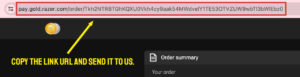
- You will be redirected to a Razer Gold payment page. COPY the link and send it to us to process payment.