I am having trouble using my discount coupon. What should I do?
We’re sorry for the inconvenience and appreciate your patience. Please
Join our Telegram Channel for Coupon Codes & Updates on Special Promotions! > Click Here to Join <
𝐓𝐨 𝐯𝐢𝐞𝐰 𝐲𝐨𝐮𝐫 𝐜𝐮𝐫𝐫𝐞𝐧𝐭 𝐒𝐩𝐚𝐜𝐞 𝐏𝐨𝐢𝐧𝐭𝐬 𝐛𝐚𝐥𝐚𝐧𝐜𝐞:
Step 1: Log in to your SpaceGaming account @ https://spacegaming.sg/login/
Step 2: Navigate to https://spacegaming.sg/my-points/ to view your points balance.
Alternatively, after you log in, you can navigate to “My Account” on the header, and click on Points History.
𝐒𝐭𝐞𝐩𝐬 𝐭𝐨 𝐑𝐞𝐝𝐞𝐞𝐦 𝐒𝐩𝐚𝐜𝐞 𝐏𝐨𝐢𝐧𝐭𝐬
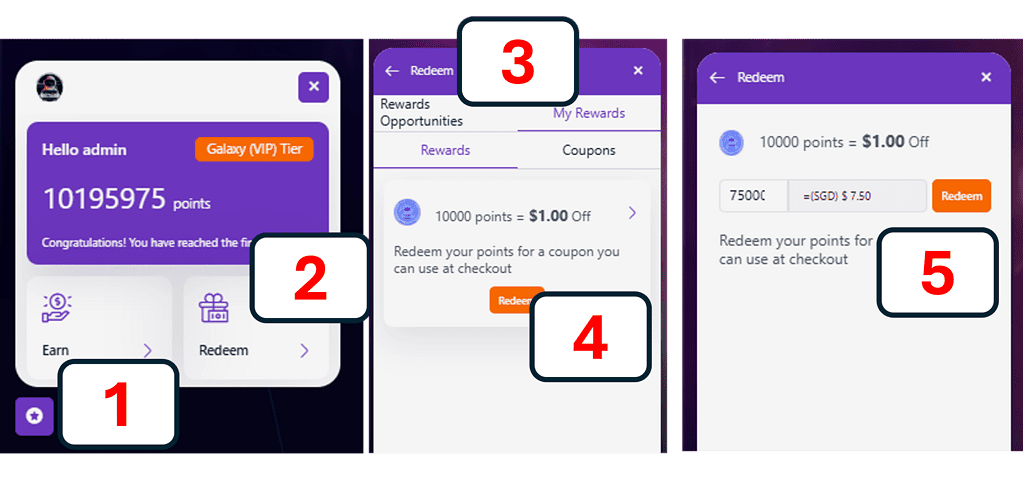
📌𝐕𝐢𝐝𝐞𝐨 𝐀𝐥𝐭𝐞𝐫𝐧𝐚𝐭𝐢𝐯𝐞: You can also watch this 20 seconds video on how to redeem: https://vimeo.com/1123672516?share=copy
In February 2026, a rewards catalogue is being planned for development to increase the breadth of rewards redemption offered (E.g., Customers can exchange a set number of points for a specific free product such as Mobile Legend Diamonds)
If you have any questions or need further assistance, feel free to reach out to us via our Telegram or WhatsApp;
We’re sorry for the inconvenience and appreciate your patience. Please
The 75,000-point cap is in place as a 𝐩𝐫𝐞𝐯𝐞𝐧𝐭𝐢𝐯𝐞 𝐦𝐞𝐚𝐬𝐮𝐫𝐞
We generally do not allow the stacking of multiple 𝐒𝐩𝐚𝐜𝐞𝐆𝐚𝐦𝐢𝐧𝐠
ℹ️ 𝐀𝐛𝐨𝐮𝐭 𝐏𝐫𝐢𝐜𝐞 𝐌𝐚𝐭𝐜𝐡𝐢𝐧𝐠 Generally, we do not offer price
Thank you for asking. While we can’t guarantee the next
Thank you for asking. We typically host our referral campaigns
[cbxwpbookmark]